RVC Voice Timbre Conversion
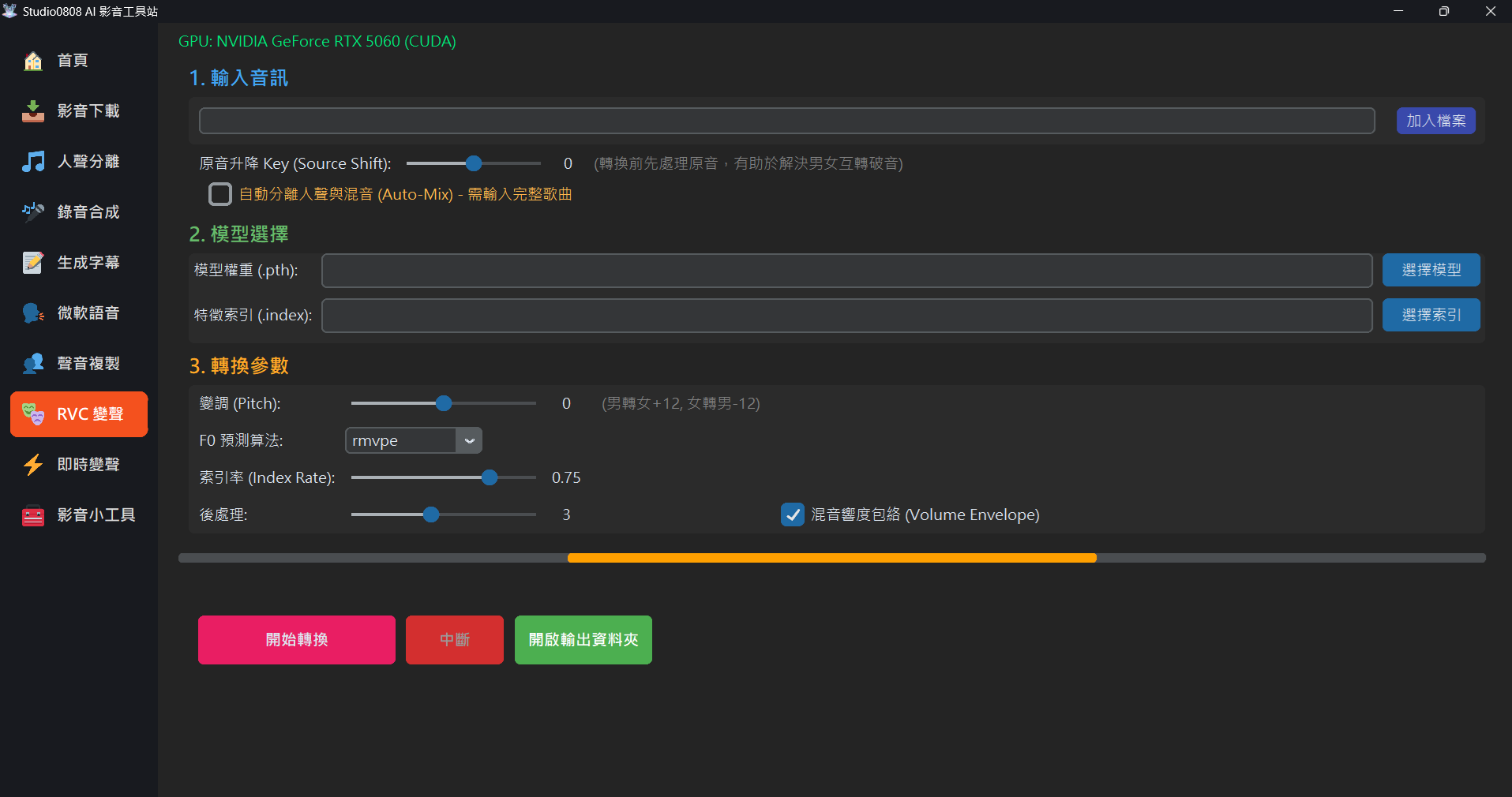
01. Overview
RVC (Retrieval-based Voice Conversion) is a powerful AI voice conversion technology. Unlike "Voice Cloning (input text to output speech)", RVC's operation involves "inputting an original sound clip," and the AI retains the original speaking or singing intonation, emotion, and rhythm, but replaces the timbre with your specified model target.
This technology is most commonly used to create "AI Covers", such as having a famous singer sing someone else's song, or to hide one's real voice for live streaming and video dubbing.
02. Operations Section Explanation
1 Input Audio
This is your original sound source to be converted:
- Standard Flow (Clean Vocals): The most stable approach is to first use the "Vocal Separation" feature to strip the song's accompaniment, and only feed the pure clean human voice to RVC. After conversion, merge the new vocals and accompaniment yourself.
- Source Key Shift: [Voice Cracking Savior] If you find the voice sounds very fake or can't hit high notes when converting (e.g., a male singing a female's song), you can directly apply a Key Shift to the "original audio file" here (e.g., -2 or -4). The program will change the pitch of your original audio losslessly in the background before sending it to the AI, which will greatly improve the naturalness of the converted voice!
- Auto-Mix: If you find processing things yourself too troublesome, you can directly
input a complete song with accompaniment and check "Auto-Separate Vocals and Mix".
The program will automatically separate the vocals in the background, send the vocals to RVC for
conversion, and finally automatically synthesize the converted vocals with the original
accompaniment! Done in one step!
(Note: This feature consumes more computing time, please be patient)
2 Model Selection
Load the voice of the person you want to "become" here:
- Model Weights (.pth): The soul of voice conversion, containing the person's timbre characteristics. Must be specified!
- Feature Index (.index / Optional): An auxiliary file generated during model training. It helps the AI make articulation and pronunciation closer to the model itself during conversion. Select it if you have it; it functions without it.
03. Detailed Conversion Parameters (Core Must-Learn)
RVC's most powerful aspect is its highly flexible parameters. Proper adjustment can save voice cracking, missing audio, or make cross-gender covers sound seamless.
| Pitch Shift (Pitch) |
Function: Changes the fundamental frequency (pitch) premise of the input sound,
measured in "semitones". Usage: If it's originally a male voice and you want to convert it with a female model, it's recommended to set Pitch to +12 (up one octave). Conversely, for female
to male, set it to -12. Keep it at 0 for same-gender conversion. If
you need to change the song's key itself to fit the model's vocal range, you can also fine-tune
like `+1` or `-2`.
|
|---|---|
| F0 Prediction Algorithm |
Function: The method the AI uses to track your original articulation pitch
curve. Options:
|
| Index Rate |
Function: Controls the degree to which voice characteristics "lean towards the
model" (range 0~1). Requires a .index file to take effect.Usage: Higher values: Articulation and tone will be more like the model itself, but if the original audio quality is poor, an excessively high index rate will cause various weird "artifacts (buzzing)". Lower values: Will have more traces of your own original voice. Recommendation: Default 0.75. If weird noises appear, lower it to
0.3 ~ 0.5.
|
| Filter Radius |
Function: When the pitch (F0) trajectory fluctuates wildly (e.g., prediction
errors caused by breathiness or voice cracking), use this value for median filtering to smooth
it. Effective only when greater than 3. Usage: If you notice the converted voice suddenly has extremely unnatural "off-key or popping sounds" in certain sections, you can increase this item to weaken this abrupt change. Recommendation: Default 3. Increase if you encounter breathiness
or popping.
|
| RMS Mix Rate |
Function: Determines how much the "volume change of the output sound" refers to
the "volume of the original input sound". Usage: Default 0.25 means only a quarter of the output sound's
volume fluctuation follows your input, and three-quarters are determined by the model. If you
check this (or increase the value closer to 1), where the AI shouts or whispers, the volume
changes will more closely restore the level of your original recording.Recommendation: Check it if you want obvious emotional fluctuations (large difference between loud and soft); uncheck it (set to 0) if you want the volume of every sentence to be very even. |
If you use a male voice to sing a female's song (male to female), first try setting the Pitch Shift to +12. If it still sounds weird, the reason is usually that the male simply can't hit those high notes. In this case, it is strongly recommended that you **make good use of our "Source Key Shift" feature in the first section**. Lower your original voice by -3 to -6 semitones, and keep Pitch at +12. Feeding the modified low-range vocals to RVC will yield miraculously natural results!
04. Troubleshooting
Q: Why does it suddenly pop up "Cannot find model file" or "Interrupted" during conversion?
Solution:
Please ensure that the filenames of your .pth or .index files, and the "folder
name" they are in, absolutely do not contain any spaces, Chinese characters, Japanese
characters, or special symbols!
RVC's underlying Python is very strict about path parsing. Please change folder and model names entirely
to pure English + numbers.
Q: I checked "Auto-Separate Vocals and Mix", why is the output only accompaniment without vocals, or the program freezes and won't run?
Solution:
This indicates the underlying Demucs vocal separation module failed.
The cause is likely insufficient graphics card memory (VRAM) to load these two resource-heavy AI
processes simultaneously. It's recommended to first go to the "Vocal Separation" menu, manually extract
a pure vocal file, then bring that file here for voice conversion, and finally use video editing
software to layer it with the accompaniment yourself.
Q: The converted voice sounds like it has a cold, or like an alien talking?
Solution:
This is because RVC's algorithm caught the wrong vocal range. The most effective solution is: Change the
F0 Prediction Algorithm!
If you originally used rmvpe, change it to fcpe or crepe and run
it again; this usually results in massive improvement. Additionally, please check if your
Pitch shift is set backward.