AI Subtitle Generator & Auto-Sync Engine
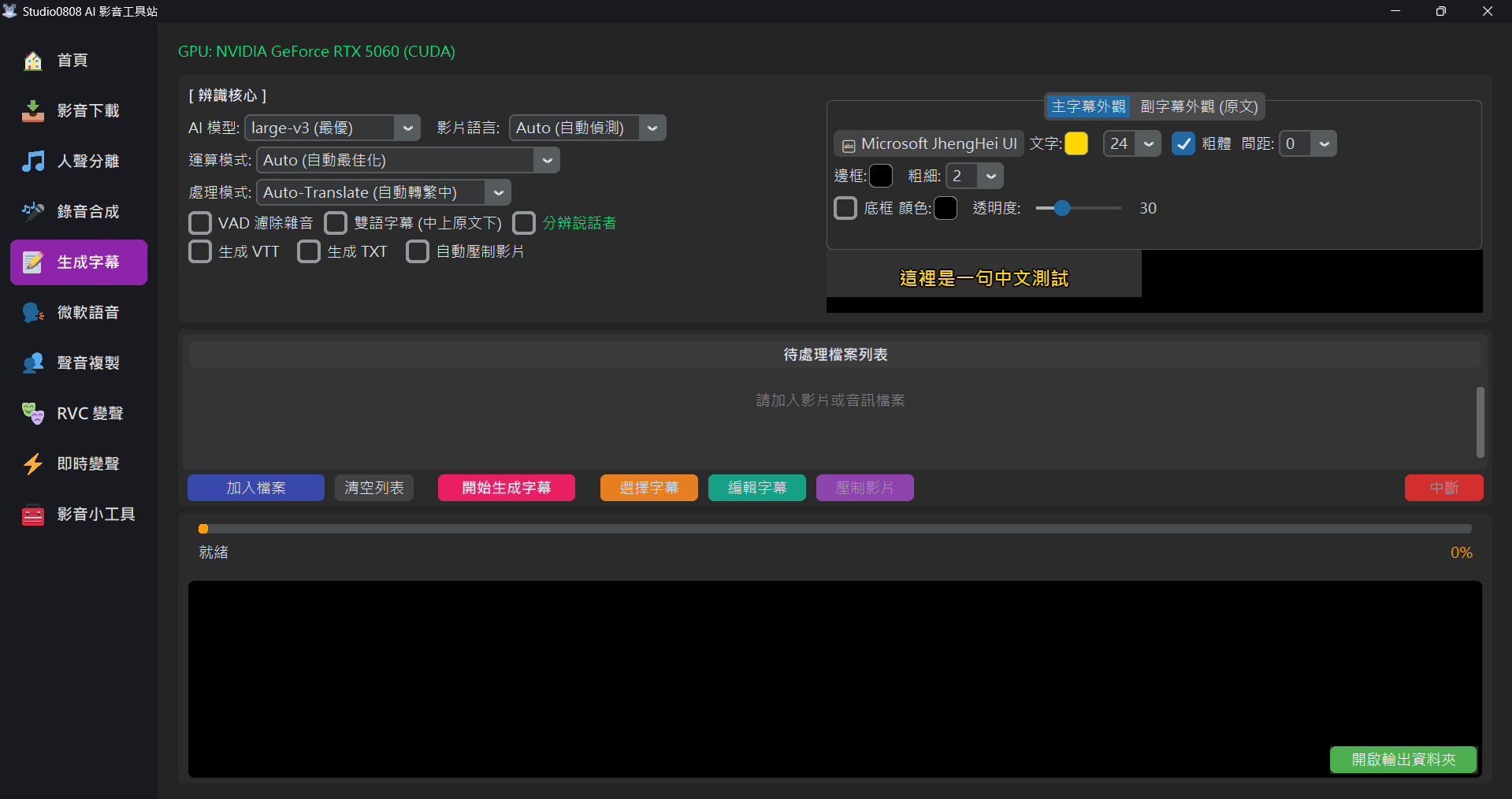
01. Overview
The Subtitle Generation Module uses OpenAI's open-source Whisper Series (Fast-Whisper implementation) as its recognition core. It can automatically transcribe any major video or audio file (such as MP4, MKV, MP3, M4A, WAV, FLAC, AAC, OGG) into accurate, time-stamped subtitles (SRT/VTT).
This system not only supports basic subtitle generation but also integrates Auto-Translation, Bilingual Subtitles layout, and a one-click Auto Burn-in feature, allowing you to produce finished, subtitled videos without opening other editing software.
02. AI Core Parameters Explained
🧠 AI Model Selection
We provide four different tiers of models. You can choose based on your PC's performance and accuracy needs:
- medium: Fast VRAM: ~2GB
Suitable for videos with clear, standard dialogue. Fastest speed, but slightly weaker at recognizing proper nouns or fast speech. - large-v2 (Good): Balanced VRAM:
~4GB
Currently the most stable version, striking a great balance between accuracy and speed. Suitable for most YouTube videos. - large-v3-turbo (Better): New Tech VRAM:
~6GB
A speed-optimized V3 version, retaining V3's high-recognition traits but computing faster. - large-v3 (Best): Highest Quality VRAM:
~10GB+
OpenAI's latest and most powerful model. Most resistant to multi-language mixing, accents, and background noise, but requires a powerful graphics card and plenty of VRAM.
🗣️ Video Language
Specify the language spoken in the video. While setting it to Auto is usually accurate, if
the video has very sparse dialogue or loud background music, manually specifying the language (e.g.,
English) can significantly improve accuracy.
⚙️ Processing Mode
- Auto-Translate (to Traditional Chinese): Regardless of whether the video is English, Japanese, or Korean, the system will automatically translate and output "Traditional Chinese" subtitles.
- Original (Original Text): The language spoken in the video dictates the output subtitle language (e.g., Japanese video outputs Japanese subtitles).
📝 Custom Vocabulary (Initial Prompt)
Are proper nouns or special names always mistranscribed? You can manually input a list of proper nouns or specific vocabulary into this text box. This guides the Whisper model to prioritize recognizing your defined terms, significantly improving transcription accuracy and saving you massive amounts of proofreading time!
⏳ Progress and ETA Estimation
The system features real-time "Progress and Estimated Time of Arrival (ETA)" displayed directly on the progress bar during subtitle generation, fully supporting both CPU and GPU modes. You can easily see how much longer the subtitle processing will take at a glance.
🛡️ VAD (Voice Activity Detection) Filter
This is a highly important feature. If checked, the AI will first analyze "where there is human voice"
before transcribing.
Purpose: Prevents the AI from hallucinating subtitles (like meaningless symbols or
repeated words) during purely musical or silent segments.
Recommendation: Turn on manually depending on the situation. It
is turned off by default in the latest version to prevent accidentally deleting soft-spoken
or whispered dialogue.
👥 Speaker Diarization
Uses Pyannote AI for audio track separation, automatically recognizing how many people are speaking in
the video, and pre-pending speaker tags (e.g., [SPEAKER_00]:,
[SPEAKER_01]:) to the beginning of subtitles.
🔑 First Time Use & Authorization Check: The system will pop up a window asking for a Hugging Face Access Token (starting with
hf_). This is a free service. If you encounter authorization errors, please follow these steps
to verify:
- Go to the pyannote/speaker-diarization-3.1 and pyannote/segmentation-3.0 model pages.
- Ensure you are logged into your Hugging Face account.
- If you haven't agreed to the terms, an agreement and form will appear. Fill it out and click "Agree and access repository".
- If you click in and directly see the model description and "Files and versions" list, it means you have successfully authorized!
03. Subtitle Output & Style
📄 Output Formats
- SRT: The most universal subtitle format, containing timestamps and text.
- VTT (WebVTT): Web-specific subtitle format, supporting simple styling.
- TXT: Plain text file, no timestamps. Ideal for organizing transcripts.
- Auto Burn-in: "Burns" the subtitles directly onto the video frames, generating a new MP4 file.
🎨 Independent Style Settings (Exclusive Lossless ASS Dual Engine)
Our subtitle generation core utilizes a powerful Dual-Layer Overlay Dynamic Calculation Engine. It not only guarantees compatibility with all video resolutions but also allows the "Primary Subtitle" and "Secondary Subtitle (Original Text)" to have completely independent visual designs without interfering with each other!
On the right side of the interface, we provide an intuitive Tabview:
- Primary Layout: Controls the primary translated language (usually Chinese).
- Secondary Layout (Original): Controls the secondary language underneath (only visible when "Bilingual Subtitles" is checked).
Within each tab, you can independently configure the following parameters, and the settings will sync in real-time to the Preview above:
- Font & Bold: Click the button to select from all system-installed fonts (like Microsoft JhengHei).
- Color & Size: Customize your text color freely.
- Spacing: Customize the distance between characters in the subtitle (supports values from 0-30) for more flexible layout formatting.
- Outline: Independently thicken the stroke around the text to prevent glare.
- Background Box: Add a semi-transparent custom background color behind the text (for
the ultimate Netflix-style viewing experience). Through underlying
PrimaryStyle/SecondaryStylecalculation tech, even if you overlap two lines with different colored boxes, the layout will never break!
04. Troubleshooting
Q: Receiving "VRAM OOM" or "System RAM OOM" errors?
Cause: Insufficient PC memory to load the large model.
Solution: Please downgrade the model to medium or
large-v2 (Good). The difference in results is usually minor, but it allows the
program to run smoothly.
Q: The burned-in video has no sound?
Solution: This issue has been fixed in the latest version. The system now forces extraction of the original audio track and transcodes it to AAC format, ensuring audio is fully preserved.
Q: What are Bilingual Subtitles?
A: This is an incredible tool for learning foreign languages! When checked, the system simultaneously displays both the "Translated/Target Language" and the "Original", formatting them automatically (Translated on top, Original on bottom).