Vocal Separation Engine
01. Core Technology
This application integrates Meta's (Facebook) state-of-the-art music separation model, Hybrid Transformer Demucs (htdemucs), providing you with studio-grade track separation services.
Unlike traditional EQ filtering, AI models can truly "understand" different instruments in music, perfectly isolating them into:
- 🎤 Vocals: Preserves the singer's vocal details.
- 🥁 Drums: Independent percussion track.
- 🎸 Bass: Low-frequency instrument track.
- 🎹 Other (Instrumentals): Piano, guitar, synths, and other instruments.
02. Supported Models
We've curated the three most powerful pre-trained models to suit different needs:
🚀 htdemucs V4 (Standard - Fast) Default
This is the standard Demucs V4 model, balancing separation quality with processing speed. It is suitable for 90% of use cases, especially creating Karaoke backing tracks.
🎯 htdemucs_ft (Fine-tuned - High Detail)
The Fine-tuned version is specifically optimized to "preserve vocal details". If you are extracting dry vocals for AI Voice Cover Training, this model typically retains more high-frequency nuances.
💎 mdx_extra (MDX-Net V3 - Highest Quality)
This is the top-tier high-quality model based on the MDX-Net architecture. It provides industry-leading separation purity, perfect for users with extreme audio quality requirements.
03. ⚠️ Critical Concept: Why is there echo remaining?
This is a very professional and common question! The primary job of "Vocal Separation" models like Demucs is to "separate human vocals from background instruments (BGM)".
However, vocals extracted from pop songs or videos often still contain heavy spatial reverberation (Reverb), Echo, or Chorus. This happens because mixing engineers intentionally add "spatial effects" during studio recording or post-production to make the voice sound fuller and rounder.
How does this affect AI Covers (RVC)?
- Fatal Impact: If you feed vocals containing "echo/reverb" to an AI model (like RVC or GPT-SoVITS) during training, the AI will incorrectly learn that the reverb is an inherent part of the singer's timbre.
- Result: The trained model will permanently speak with a hollow "cave-like" sound, making the output blurry and distant.
※ Why do vocals sound weird/unlike the original after "De-Reverb"?
When you check "☑️ Enable De-Reverb Filter" and listen to the resulting
_Vocal_Dry.wav, you might find the voice sounds very thin or slightly robotic. This is
a normal "Studio Magic Deprivation Effect", for the following reasons:
- Chorus and Doubling: Pop songs usually overlay multiple harmonizing tracks behind the lead vocalist. The de-reverb model only removes "spatial reverb" but cannot delete vocal harmonies. Thus, you hear a strange spatial effect of multiple voices layered together.
- The "Make-up Free" Voice: Mixing engineers use million-dollar EQs and reverbs to polish a singer's voice. When AI roughly strips away these "cosmetics", what's left is naturally the driest, unpolished, true raw voice.
🏆 How to get the highest quality AI training material?
To train a flawless S-Tier voice conversion or cloning model, top-tier material is almost never pop songs (CDs), but rather:
- Podcast Interviews
- Radio Shows
- A cappella or BGM-free live streams
These materials naturally lack complex background music and have relatively dry recording environments. After running such files through a standard denoiser or de-reverb, the output will be a perfect "zero-flaw dry vocal".
04. Detailed Operation Flow
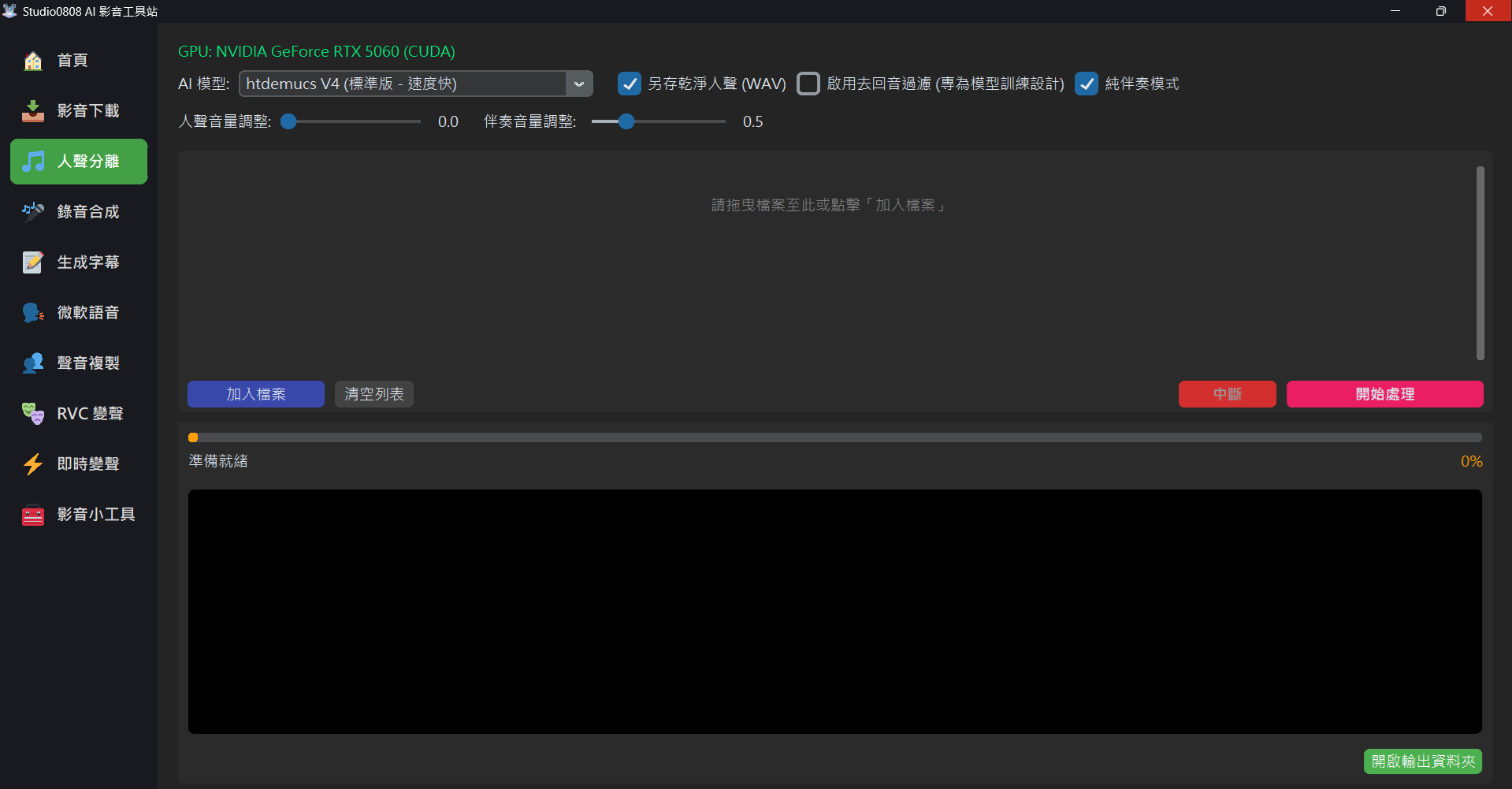
- Select Files: Drag and drop audio or video files directly into the application window, or click "Add File". Batch processing is supported.
- Select Model: Choose your desired model from the top dropdown menu (defaults to Standard).
- Settings:
- Save Clean Vocals (WAV): Highly recommended. This saves the separated vocals independently as a high-quality WAV file for easy editing.
- Instrumental Only Mode: If checked, the program will automatically mix drums, bass, and other instruments into a single "Instrumental Track", ready for you to sing along.
- Start Processing: Click the orange button, and the application will automatically invoke the GPU (if available) for high-speed computation.
💡 Tip: Processed files are automatically saved in the Outputs/Vocals folder.
04. Q&A
Q: Why is processing so slow?
A: Deep learning models require massive matrix computations. If you use an NVIDIA Graphics Card (GPU), processing is typically 10~50x faster than CPU. If you only have a CPU, you'll need to wait longer.
Q: Why does the first song take exceptionally long?
A: The first time you use a new model, the program needs to download the model weights (hundreds of MBs) from the cloud. Subsequent uses will be extremely fast.
Q: Encountering "Out of Memory" errors?
A: This means your graphics card VRAM is insufficient. Don't worry, this application features an auto-fallback mechanism. Upon detecting low memory, it automatically switches back to CPU mode to finish the task.
Q: Can this application directly De-Reverb for me?
A: Yes! Starting from V2.3, this application natively integrates UVR5's
VR Architecture top-tier de-reverb model.
Simply check "☑️ Enable De-Reverb Filter (Designed for Model Training)" on the
interface. After isolating the vocals, the system will automatically launch a second AI neural
network pass in the background to extract the reverb, outputting a flawless
_Vocal_Dry.wav for you. This file can be directly dropped into RVC or GPT-SoVITS for
training without relying on external software!
05. Core Specs
This feature is built upon the following open-source technologies, ensuring maximum compatibility and performance:
- AI Engine: Demucs (Hybrid Transformer) & MDX-Net
- Deep Learning Framework: PyTorch (with CUDA Acceleration)
- Audio Processing: FFmpeg (for high-quality encoding/decoding)
- Vector Search: Faiss (for feature retrieval)